
Increase the usage of voice input on the ChatGPT mobile app
ChatGPT, by OpenAI in 2022, is a leading AI-powered conversational platform.
Available worldwide, ChatGPT assists users with tasks ranging from answering questions and generating content to analyzing data and creating images, offering speed, accuracy, and versatility.
About ChatGPT
Opportunities
Indian apps with built-in voice functionality report ~30% increase in user engagement and retention.
~60% of users prefer voice interfaces over text due to convenience & literacy barriers
Voice enhances accessibility, especially for users with literacy/typing challenges
700+ Mn
Secondary Research
India’s voice recognition market size
Factors Influencing the rise of voice & speech recognition technology
Conversational AI (text+speech)
Smart Speaker (Alexa, Google Home)
Next-Gen Search Engines (Voice & Visual)
US $462.8 Mn
US $2982.4 Mn
23% CAGR
FY24
FY33
smartphone users
60%
400% YOY
use voice search
Hindi voice search queries
Indians
INCREASE
Challenges
PlayStore Reviews
Secondary Reviews from Web
On Reddit, users express mixed sentiments: “I hate receiving voice notes… because I have to find a private/quiet place to listen…”
Difficulty ensuring accurate recognition across diverse accents, dialects, and languages.
Major design & infrastructure challenges in replacing GUIs with voice at scale, especially for first-time digital users.
App crashes, frequent glitches and frequent updates worsen voice transcription
Low Voice Recognition Accuracy & fails mid-way, poor handling of long inputs, App stops listening & cuts off in noisy environments
Auto-send of transcripts & users can’t review/edit before sending
App Interrupts user while speaking & doesn’t wait until user finishes speaking and even gives unnecessary feedback ("I’m listening") in middle of input
Current Mobile Experience
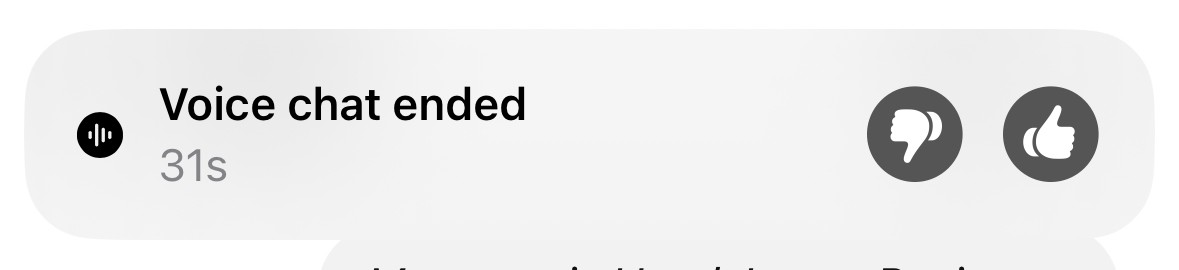
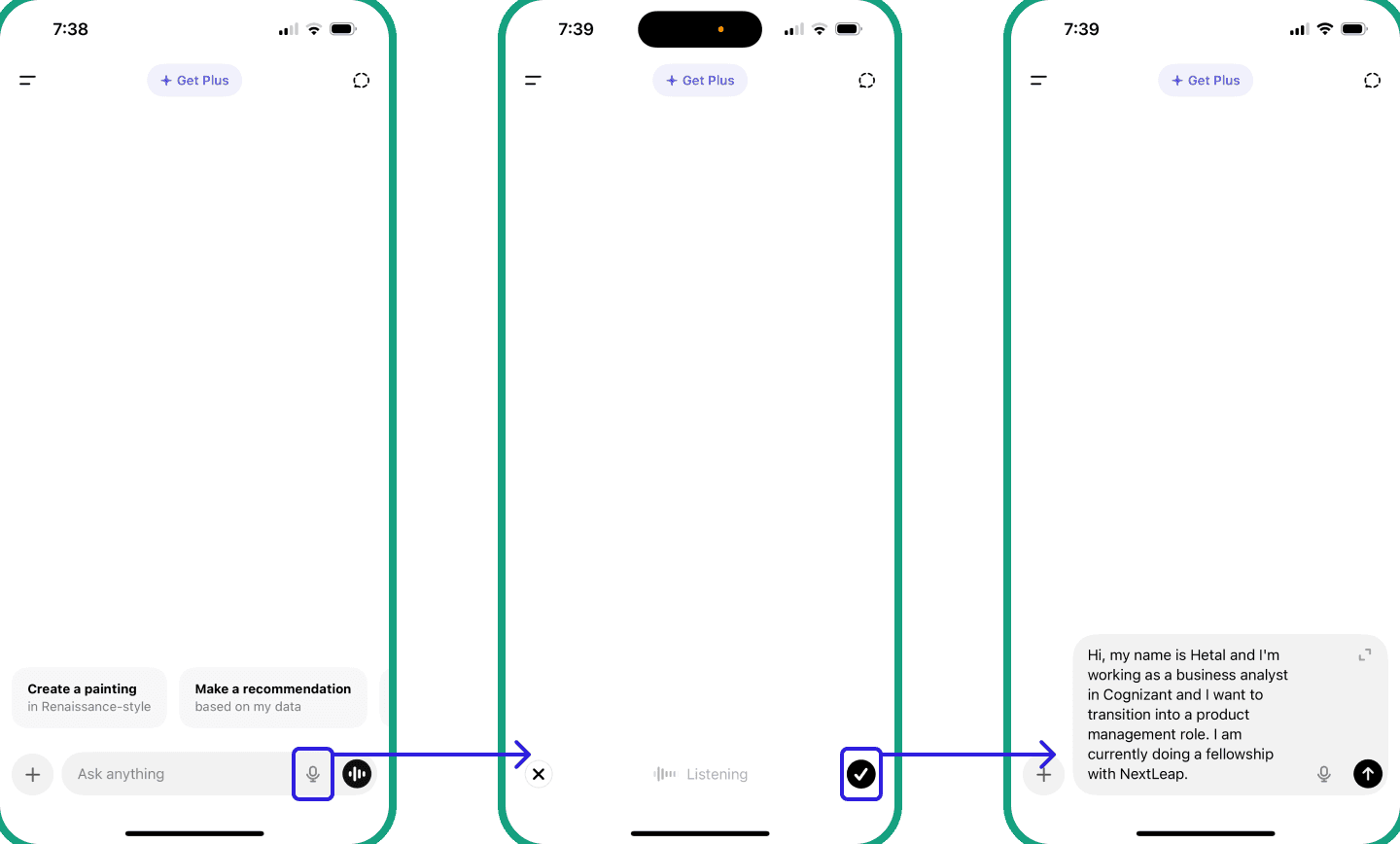
Voice-to-Text Feature
Discoverable
Easy to use
Intuitive
Good Accuracy
Check transcripts before sending (iOS device only)
At the end of the conversation it asks for feedback as well
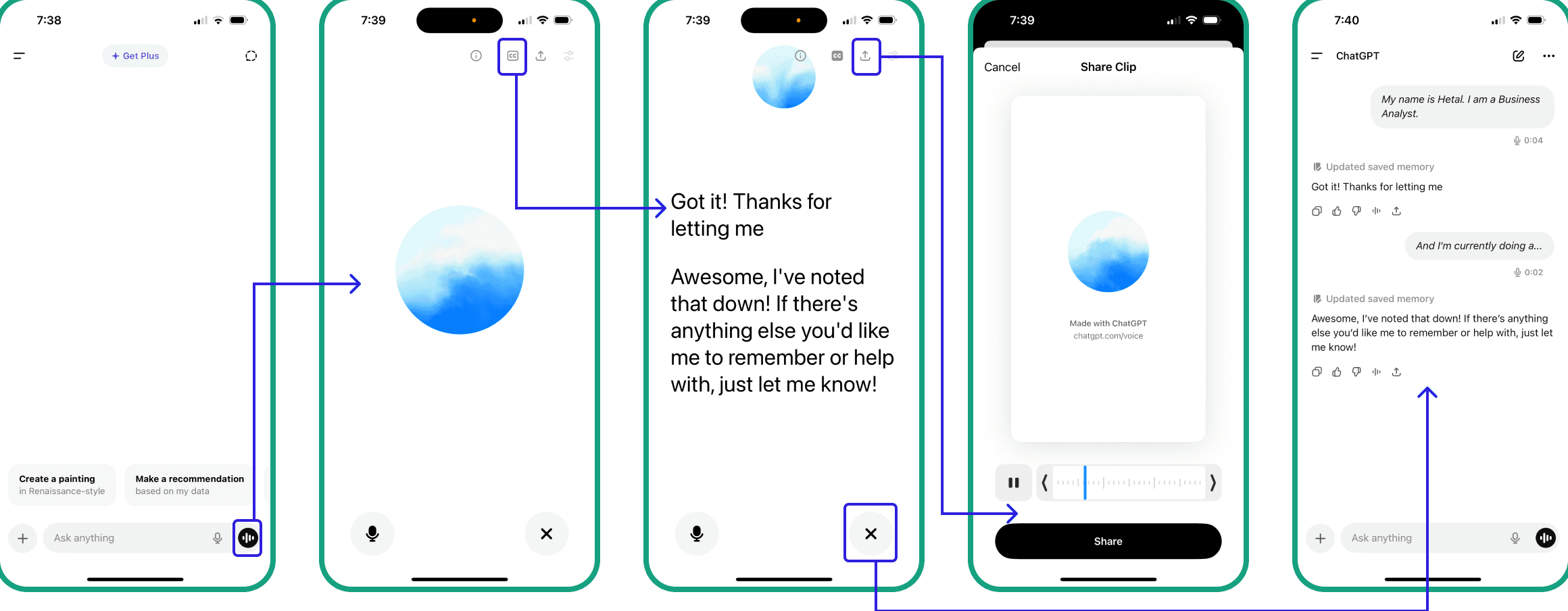
Conversational AI


Competitor Analysis
Voice Input Availability
Strengths
Limitations
Mobile app (standard & advanced voice modes)
Human-like tone & emotional expressiveness; Whisper ASR praised for accuracy
Usage limits; occasional input recognition issues & interruptions in voice chat
Broad support across Android, smart speakers, etc.
Deep OS & app integration, natural two-way voice, multimodal with Search & Vision
Requires wake words; limited emotional tone (not generative)
Voice across Apple devices with wake word
Strong privacy; accessibility features like Personal Voice
Historically weak voice recognition and conversational depth
Full voice via wake word "Alexa" across Echo devices
Rich smart home & skill ecosystem; expanding generative AI features
Voice responses are more formulaic; limited natural emotional tone
Voice notes; recently added voice + image search with AI
Familiar, messaging-native voice input; seamless context
Meta AI integration still rolling out; limited voice UI polish & visibility
Voice search for video discovery; voice used for hands-free browsing (ASR)
Convenient for long-tail content discovery and multilingual users
Limited to search & discovery no conversational responses
Primarily text-based search assistant with live web results
Source-backed answers, strong research support
No current voice input capability


KPI Tree and Product Outcomes
Increase Voice Input Users
Avg. voice queries per user
#ChatGPT voice input users
#Total active app users
% users trying voice
#Avg. app sessions
% sessions where voice is used
#Avg. queries per session
Awareness
Consideration
Conversion
Retention
We can add a onboarding nudge tooltip (“Did you know you can talk to ChatGPT?”) to encourage first try.
Total active app users / % users trying voice
Make mic button more prominent
Reduce friction (one-tap start vs. long-press)
Local language support
% sessions where voice is used
Highlight benefits over typing (faster, hands-free)
Auto-suggest voice follow-up
#Avg. queries per session
Personalization & gamification (“Welcome back, ready to continue your last voice chat?”)
User Personas
Persona Name
User Segment
Demographics
Psychographics
Behavior
Needs & Wants
Students & Young Professionals
Working Professionals & Productivity Seekers
Casual & Older
Aged Users
Content Creators &
Social Users
Riya Mathur
Arjun Verma
Meena Gupta
22 yrs, Female, Student, Tier-1 city (Bangalore), heavy smartphone user
32 yrs, Male, Freelancer (Content & Marketing), Tier-1 city (Gurgaon)
48 yrs, Female, Homemaker, Tier-2 city (Lucknow), average tech comfort
Curious, values speed, hates wasting time typing long queries
Productivity-focused, early adopter of AI tools, efficiency-driven
Practical, slightly hesitant about new tech, wants simplicity
Kabir Singh
27 yrs, Male, YouTube content creator, Tier-2 city (Pune), easy with Tech
Fun-loving, expressive, trend-driven, enjoys experimenting
Uses ChatGPT while commuting or studying; voice input for summaries & quick answers
Uses ChatGPT for drafting client mails, note-taking & brainstorming marketing ideas
Uses ChatGPT occasionally for translations, recipes & general knowledge
Uses ChatGPT for jokes, storytelling, creative prompts, reel ideas & thought structuring
Fast, hands-free usage, accuracy, support in learning
Speed, reduced typing fatigue, professional tone, easy workflow
Local language support, clear navigation, simple & slow-paced responses
Natural conversations, entertaining responses, creativity booster



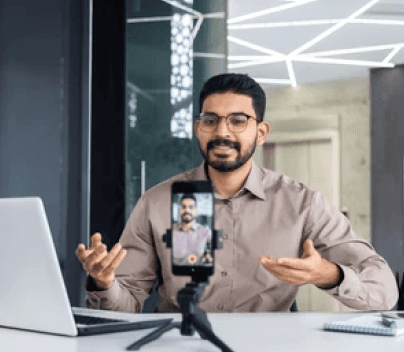
Working Professionals & Productivity Seekers are Ideal Target Segment
Focused Segment
Working professionals
Prime earning age
Comfortable with Tech
Open to paid tools
Already value productivity tools
Behavior: Repeat use cases (notes, emails, brainstorming)
Needs & Wants: Faster, smarter, hands-free — directly aligned with voice input’s value
Business Value: High retention, paid subscription conversion, and word-of-mouth credibility in professional networks
👉 Highest potential impact
Recurring usage + Revenue + Validation for pro features, making them the most strategic focus
Hypotheses
Why Working Professionals aren’t using Voice Input ??
Context & Environment Barrrier
They work in shared spaces (cafés, co-working spaces, home with family) where speaking out loud feels awkward or disruptive

Perception of Voice Accuracy
They don’t trust voice input to accurately capture each & every word (like client names or jargon's)
Speed vs. Correction Tradeoff
Fear that editing errors after dictation takes more time than typing directly
Habitual Behavior
Already accustomed to typing; don’t see strong enough benefit to change behavior
Limited Awareness
May not know how robust ChatGPT’s voice input actually is (or assume it’s only for casual use)
Privacy Concerns
Hesitant to speak sensitive & confidential things aloud
Primary Research - Online Survey & User Interviews
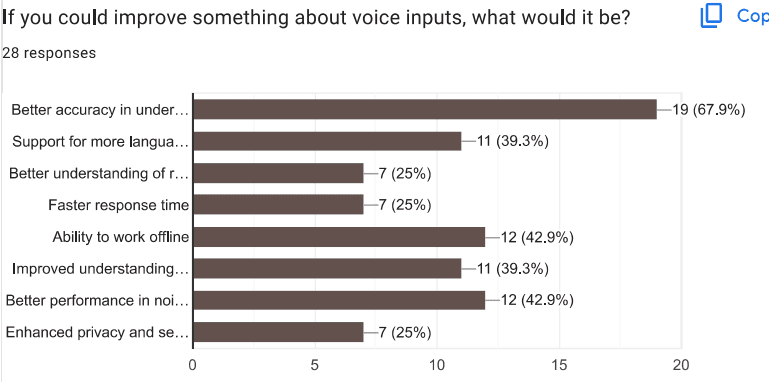
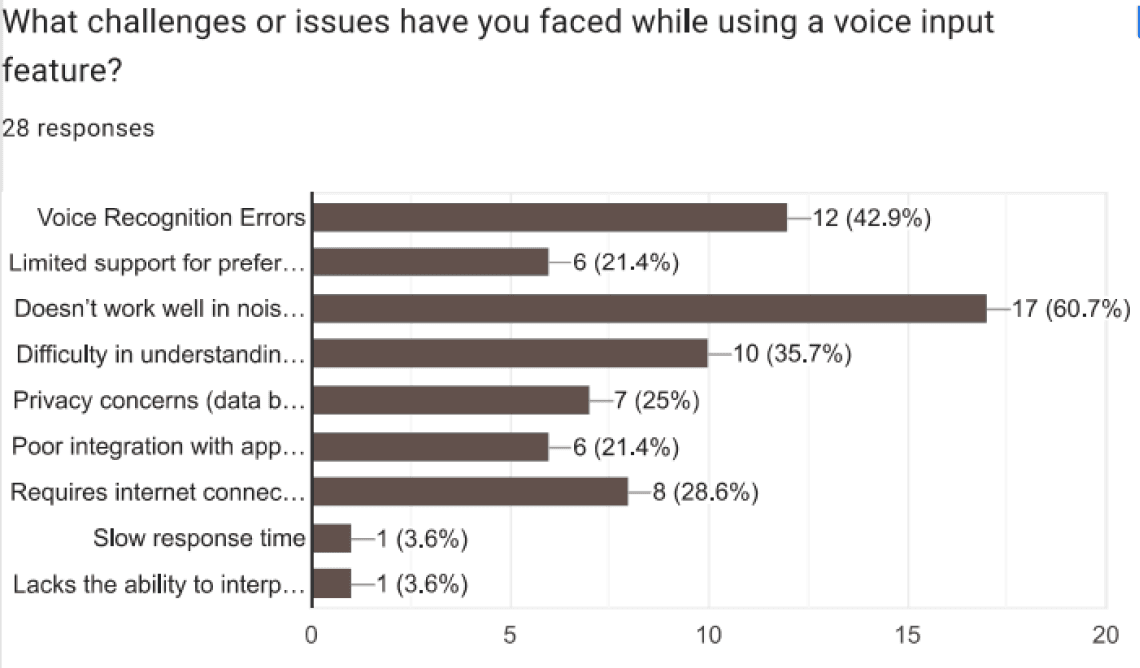
Inferences on challenges faced by users
Majority struggles in noisy environments relevant for users working in offices or remotely in cafes, co-working spaces or home with family
Voice recognition errors + difficulty with accents/language. If users don’t trust speech accuracy, they default to typing → habit reinforcement
Dependency on internet is seen as a challenge → adoption harder in Tier 2/3 cities
Very few mentioned slow response time → speed is not a bottleneck, accuracy + usability context are
1 in 4 users worry about privacy, shows hesitation in speaking aloud
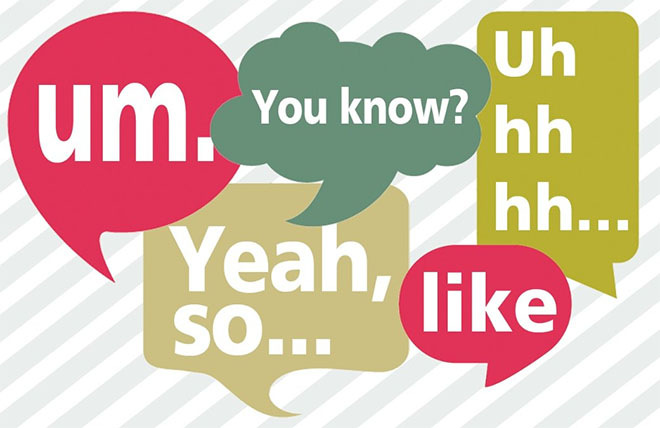
(unnecessary pauses, with filler words like "uhm" or "er," which can stem from anxiety, uncertainty, lack of vocabulary, lack of knowledge, or a fear of making mistakes)
✅ Conclusion (for hypothesis on Working Professional):
Core adoption barrier: accuracy + noise handling + offline use
Once those are solved, privacy & speed improvements become secondary but still important for professional adoption
This aligns perfectly with why Remote Workers haven’t adopted voice input yet → it doesn’t reliably fit into their real-world noisy, privacy-sensitive, productivity-driven contexts
The Cue
Need to input a query quickly
The Routine
Tries voice input → faces issues → default to typing
The Reward
Typing feels more reliable, accurate, & less frustrating → reinforces the “typing-first” habit
Objective: To understand usage patterns, barriers, and opportunities for ChatGPT mobile’s voice input feature, and identify the user segment with the highest potential impact
During User Interview one major Bottleneck I saw was low awareness & no habit of using voice input feature of ChatGPT
Who is Affected
What is it About?
As a business: Driving habit adoption of voice → higher daily active usage, differentiation from competitors, monetization potential
As a user: Saves time, reduces typing fatigue, improves productivity and workflow efficiency.
Frequent voice errors, difficulty with accents, poor noise handling → users switch back to typing
Biases/assumptions: Users believe typing is more reliable than voice
Pains: Frustration, time lost correcting errors, privacy hesitation
Desires: Reliable, accurate, context-aware voice dictation that works even in noisy or shared spaces
When: While working remotely (emails, note-taking, brainstorming)
Where in journey: During query entry → user chooses between typing and voice input
Jobs-to-be-done: “When I’m working remotely, I want to dictate content hands-free without errors so that I can save time and focus on higher-value work.”
Why Care About it?
When & Where Does it Occur?
Who experiences the problem? Remote workers, freelancers, and professionals using ChatGPT for productivity.
Consequences? Wasted time typing long queries, frustration with corrections, reduced adoption of voice input.
Who benefits when this problem exists? Typing remains the habit → voice feature underutilized.
Who benefits if solved? Users save time, feel more efficient; ChatGPT gains higher retention & engagement
How might we enable remote workers to reliably use voice input for professional tasks so they can save time and reduce typing fatigue without worrying about accuracy or context errors?
How Might we?
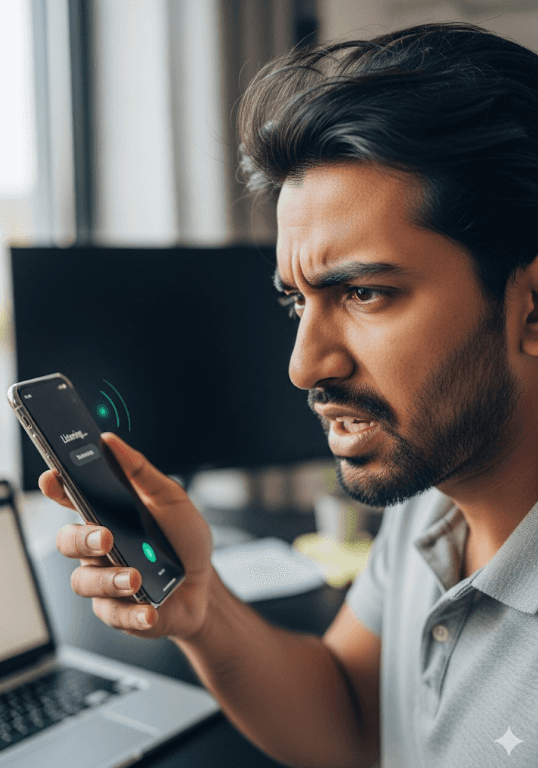
Remote workers want a reliable hands-free way to draft professional content, but poor accuracy, noise handling, and privacy concerns make them default to typing, reinforcing old habits.
Problem Statement
Why do we need to work on it Now?
With rise of remote work, professionals are seeking efficient AI-powered productivity tools. Voice is an untapped lever for driving habit adoption on ChatGPT Mobile App
Business Opportunity
How solving this problem changes behavior?
Future State Vision
Solve Accuracy Noise Privacy
Users form a reliable voice-first habit
ChatGPT gets higher engagement, retention, differentiation from competitors and later on monetization potential
Solution Ideation
Smart Noise-Cancellation & Contextual Accuracy
Trust-Building & Habit Hooking Loops
Awareness & Social Campaign (Marketing)
Smart Hybrid Mode (Product + UX)
Show live transcription as the user speaks, with confidence scores (highlighting uncertain words for quick correction)
One-tap to remove the last phrase without fully editing (reduces speed & builds confidence)
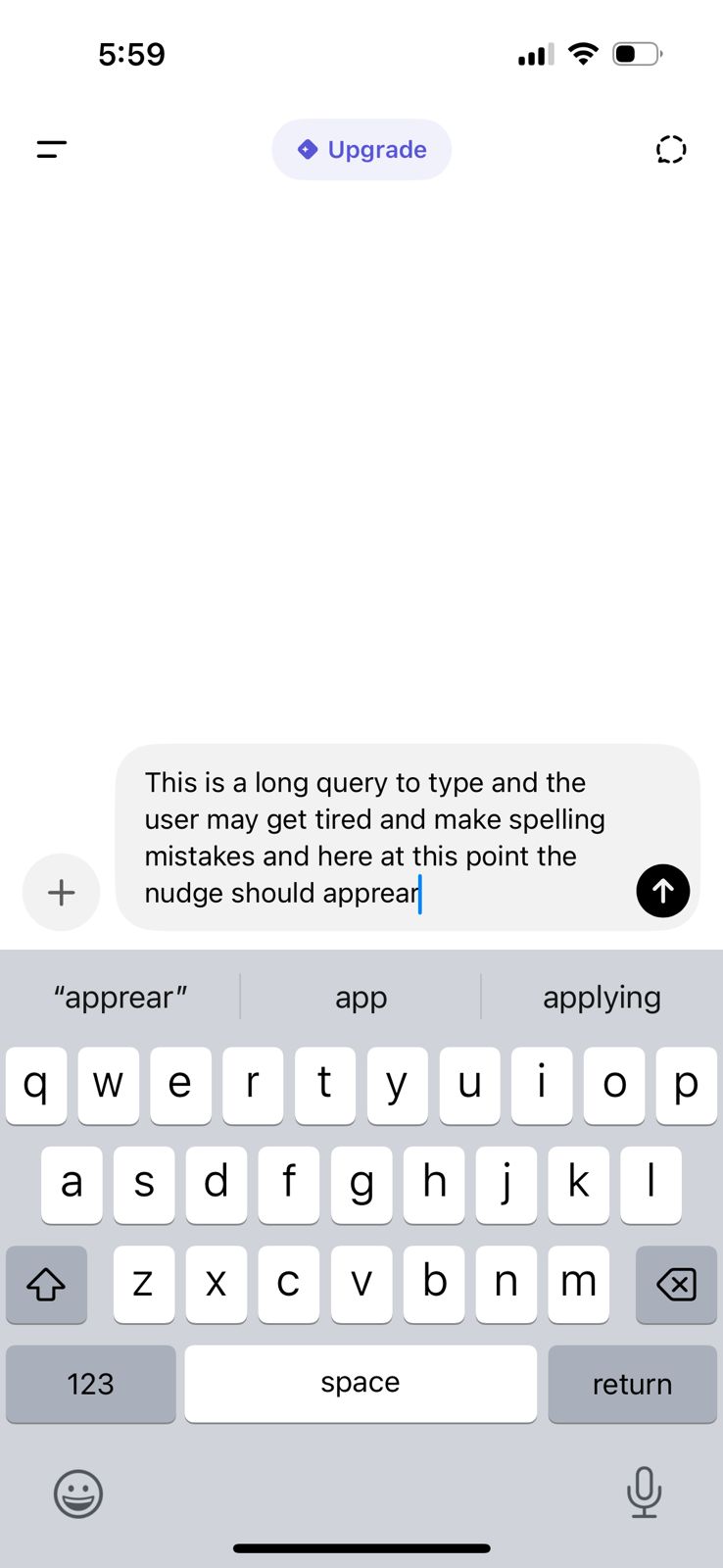
Gentle Nudges: On mobile, if a user starts typing a long query, show a gentle pop-up: “Want to say it out loud instead? Saves time”
Hybrid Dictation Mode: Users dictate, but system auto-suggests quick fixes like “Did you mean X?” like auto-correct but for voice
Option to mix typing + speaking seamlessly (switch mid-query without losing flow
Offline + noise-optimized mode for shared spaces → reassurance it “just works” anywhere
Combine typing + voice to reduce correction friction
Auto-detect background noise (like café chatter, typing, traffic) & adjust voice recognition (auto-filter)
Learn from user queries to better handle accents & jargon (Context-aware transcription)
Adaptive prompting, If uncertain, suggest alternatives (“Did you mean…?”) instead of forcing corrections
Quick demo videos inside the app showing voice handling in noisy cafés, accents & technical terms.
Testimonials from users like “Voice helps me finish work faster.”
Run a #VoiceWithChatGPT challenge on LinkedIn or Twitter showcasing productivity hacks using voice.
Also we can Integrate ChatGPT’s voice input directly into the native keyboards (iOS & Google). This can make the feature more accessible & convenient. Users would encounter it naturally while typing or speaking, which reduces friction & encourages more frequent usage.
Educate users on the robustness of voice input with real-world use cases
Position voice not as a replacement, but as an upgrade to typing
Increases awareness & shifts perception from “casual use to serious productivity tool”
Breaks typing-first habit loop & use nudges for feature adoption at just the right time
Solution Prioritization
Prioritize Trust-Building & Habit Hooking Loops
High Impact → Tackles the root habit barrier (typing habit), creates “aha” moments
Lower Effort → UI/UX changes & nudges are faster to test than heavy ML investments
High Confidence → Backed by proven behavioral design frameworks (Google Docs voice typing adoption)
Fast Wins → Can be A/B tested quickly to validate adoption lift
High Impact
Quick Wins
Big Projects
Thankless Tasks
Fill-in Jobs
Smart Noise-Cancellation & Contextual Accuracy
Trust-Building & Habit Hooking Loops
Low Effort
High Effort
Low Impact
1
2
Awareness & Social Campaign (Marketing)
3
Smart Hybrid Mode (Product + UX)
4
User starts typing a long query
Typing with Voice Nudge (Discovery)
User opens ChatGPT mobile app and starts typing a long query. A subtle tool-tip appears → “Try speaking instead?” above the chat box
Also, add a micro animation for the mic button at the same time the nudge appears to highlight & draw attention.
This will help to nudge user into start using voice & help habit disruption further
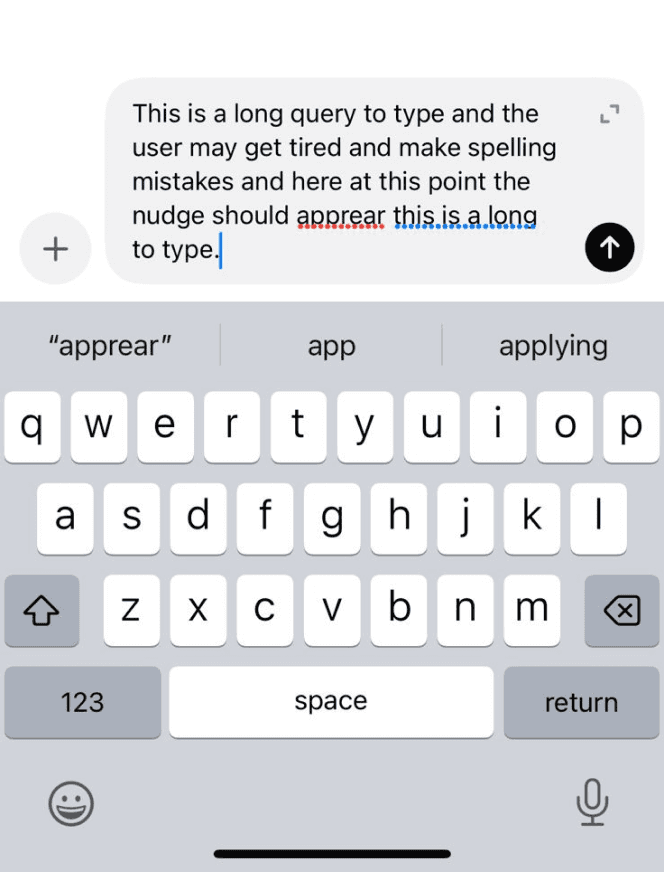
Voice Activation (Live Transcription)
This will help in better accessibility and trust in accuracy. It also supports multitasking with users glancing over texts as they speak saving time in corrections.
User taps mic & enters Voice Input Mode. Live transcription appears on screen as the user speaks.
Normal text = High Confidence
Red Dotted underlined word = Low Confidence
Blue Dotted underlined word = Grammar error

User taps the mic and uses voice input feature
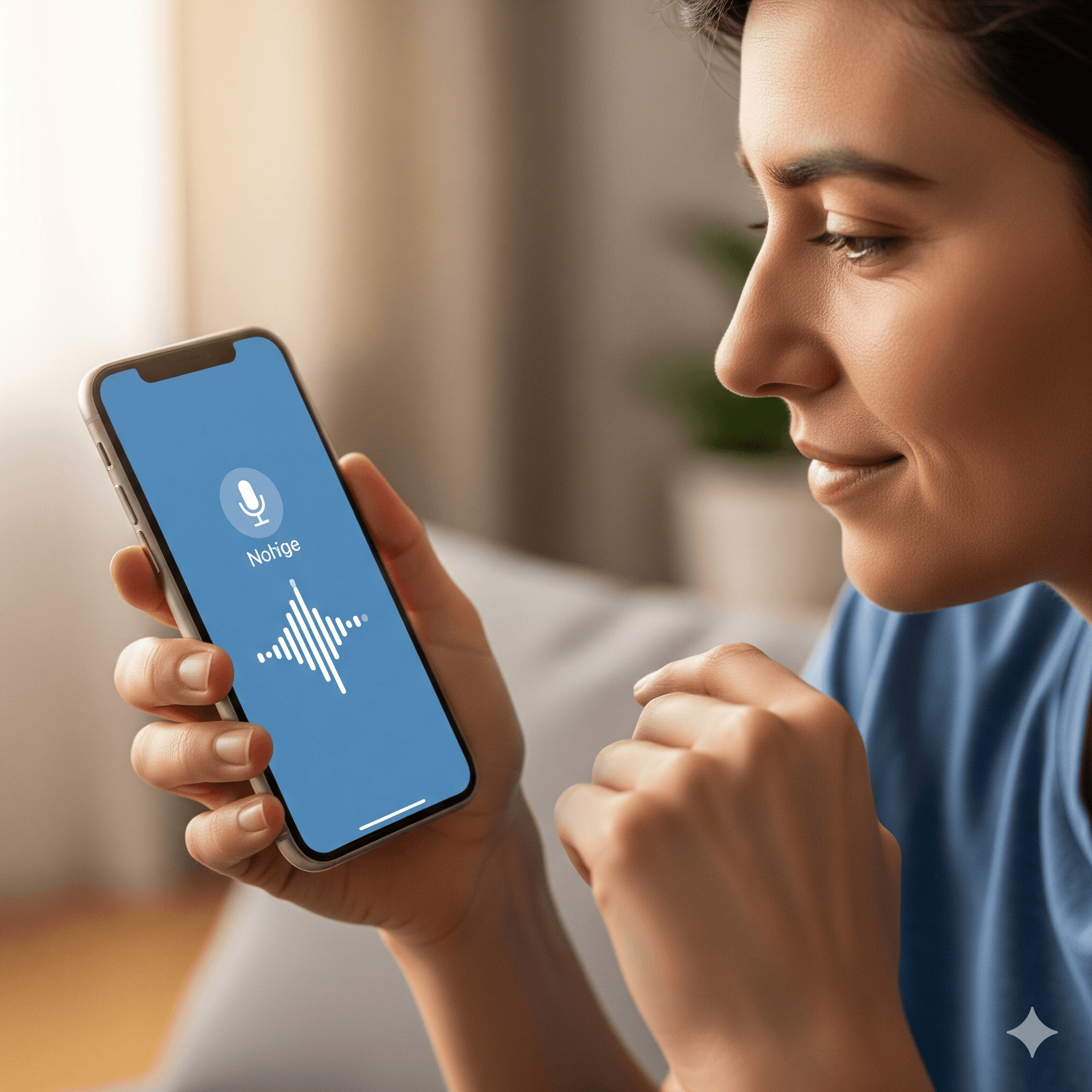
Try speaking instead?
Integrate ChatGPT’s Voice Input with the native keyboards (iOS & Google)
Correction Support
If the system is uncertain (low-confidence words), it should suggest alternative options like “Did you mean: contract or contact?”
Users feel reassured they’re in control leading to less anxiety about errors
Users can make a one-tap correction
This helps system learn from different users accents & fluency making it more reliable over time (Over time, confidence in voice grows)
Reduces friction and encourages more frequent usage
Builds trust in the technology since users will experience how accurate & reliable it is in their everyday interactions
This contributes to a higher adoption rate & a more seamless UX
Typing with remote on a TV is frustrating, voice input solves that instantly. Partnership with existing giants could give a wedge into the ecosystem (bigger reach + trust + ecosystem)
Google Keyboard
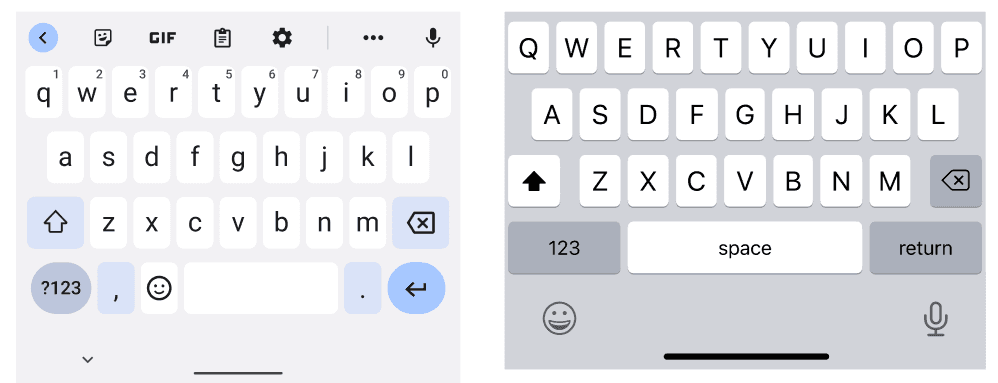
iOS Keyboard
Contact
Contract
Did you mean
or
Success Metrics
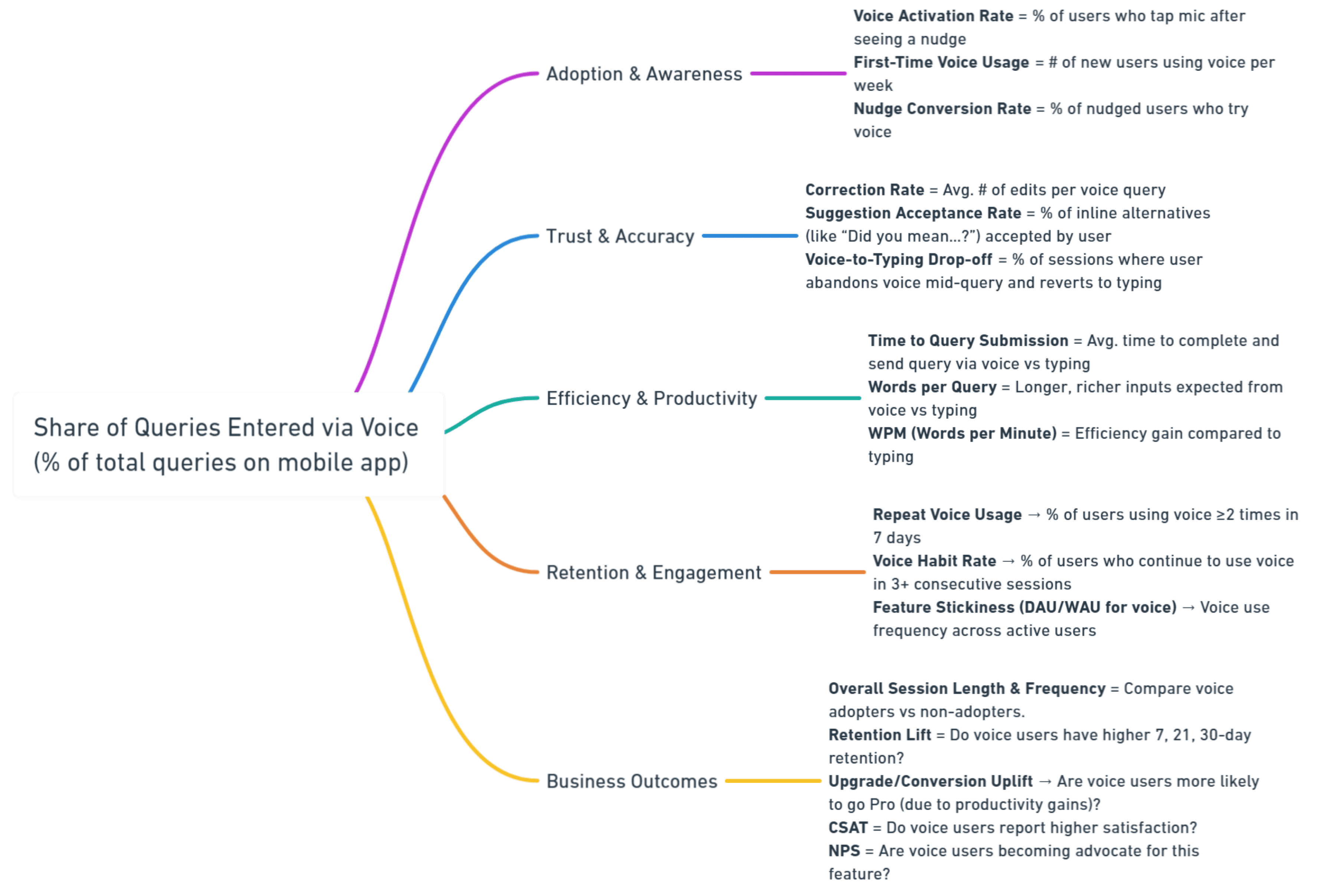
Captures whether users are actually adopting voice input as a real behavior shift (from typing-first to voice-first). Success means voice is no longer just “tried once,” but is continuously used in place of typing.
North Star Metric
Share of Queries Entered via Voice Input Feature
Supporting Metrics:
What’s Next?
Have a question or a project in mind?
I'd love to hear from you. Let's chat and make something amazing together.
Created with ❤️ by @hetalverma